
Office of Information Technology
Set up Printing on a PC
When you use server printing, you bypass papercut and whatever you print will immediately come out of the printer you send it to. In most cases, we recommend using papercut instead.
SET UP SERVER PRINTING ON A PC
Make sure you're connected to EDUROAM or an ethernet cable/your dock on campus before doing this setup.
You can either open the Start menu or taskbar and click on the or use the shortcut Windows + E
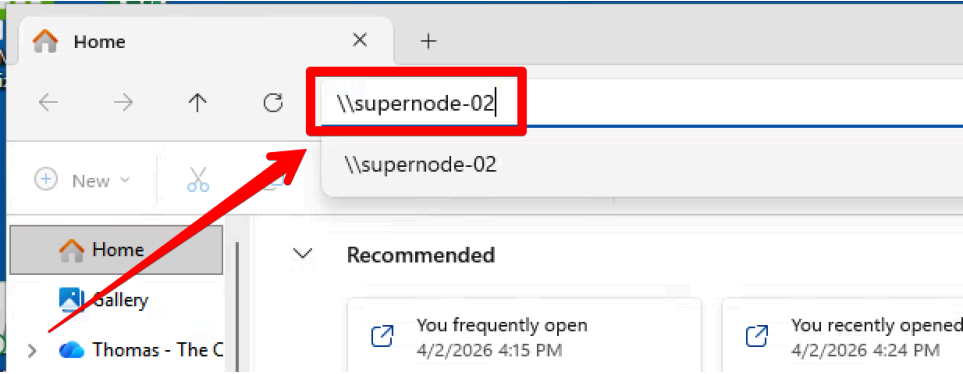
At the top of the file explorer in the address bar, clear it out and type in “\\supernode-02” and hit Enter or Return on your keyboard
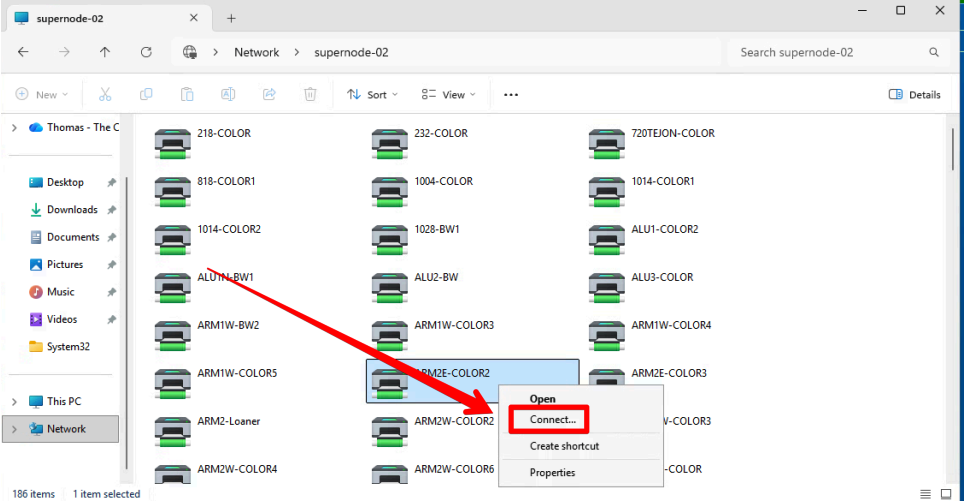
- Find your printer in the list,
- Right-click it,
- Select “connect”.
- If prompted for a sign-in after choosing select, you do not have permissions to install the printer.
- Please create a ticket via email or call the Solutions Center (x6449) for assistance

show all / hide all
Report an issue -
Last updated: 06/17/2026